Scalable Vector Graphics (SVG)

Introduction

SVG stands for Scalable Vector Graphics. It is an XML language, which can be used to draw vector graphics. Because this is an XML language, all tags must be closed.

Displayed by browserHTML markup required
SVG
<svg preserveaspectratio="xMidYMid meet" viewbox="0 0 200 100">
	<rect fill="lavender" height="100%" width="100%"></rect>
	<circle cx="100" cy="50" fill="purple" r="45"></circle>
	<text fill="white" font-size="30" text-anchor="middle" x="100" y="60">SVG</text>
</svg>

Basic Shapes

There are some pre-defined basic SVG Shapes, which can be drawn to the screen. When drawing on the screen, it is possible to specify the stroke as follows:

AttributeMeaning
fillThe color inside the drawn object
strokeThe colour of the line drawn around the drawn object
stroke-widthThe width of the stroke

Rectangle

The <rect> element is used to draw a rectangle.

Displayed by browserHTML markup required
<svg height="100" width="150">
  <rect fill="transparent" height="50" stroke="purple" stroke-width="2" width="50" x="10" y="10"></rect>
  <rect fill="lavender" height="50" rx="10" ry="10" stroke="black" stroke-width="2" width="50" x="70" y="10"></rect>
</svg>

The attributes used above are:

AttributeMeaning
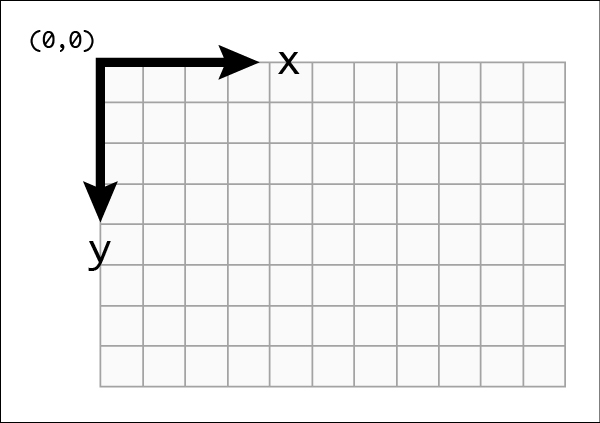
xThe x position of the top left corner of the rectangle
yThe y position of the top left corner of the rectangle
widthThe width of the rectangle
heightThe height of the rectangle
rxThe x radius of the corners of the rectangle
ryThe y radius of the corners of the rectangle

Circle

The <circle> element is used to draw a circle.

Displayed by browserHTML markup required
<svg height="100" width="100">
  <circle cx="50" cy="50" fill="transparent" r="20" stroke="purple" stroke-width="2"></circle>
</svg>

The attributes used above are:

AttributeMeaning
cxThe x position of the center of the circle
cyThe y position of the center of the circle
rThe radius of the circle

Ellipse

The <ellipse> element is used to draw an ellipse.

Displayed by browserHTML markup required
<svg height="100" width="150">
  <ellipse cx="50" cy="50" fill="transparent" rx="45" ry="20" stroke="purple" stroke-width="2"></ellipse>
</svg>

The attributes used above are:

AttributeMeaning
cxThe x position of the center of the ellipse
cyThe y position of the center of the ellipse
rxThe x radius of the corners of the ellipse
ryThe y radius of the corners of the ellipse

Line

The <line> element is used to draw a straight line between two points.

Displayed by browserHTML markup required
<svg height="100" width="150">
  <line stroke="purple" stroke-width="2" x1="10" x2="150" y1="50" y2="50"></line>
</svg>

The attributes used above are:

AttributeMeaning
x1The x position of the starting point of the line
y1The y position of the starting point of the line
x2The x position of the ending point of the line
y2The y position of the ending point of the line

Polyline

The <polyline> element is used to draw a series of straight lines.

Displayed by browserHTML markup required
<svg height="100" width="150">
  <polyline fill="transparent" points="10 60, 30 40, 50 60, 70 40, 90 60, 
            110 40, 130 60, 150 40" stroke="purple" stroke-width="2"></polyline>
  <polyline fill="transparent" points="10,90 30,70 50,90 70,70 90,90 
            110,70 130,90 150,70" stroke="black" stroke-width="2"></polyline>
</svg>

The attributes used above are:

AttributeMeaning
pointsA list of points, each number separated by a space, comma, EOL, or a line feed character. Each point must contain two numbers, an x coordinate and a y coordinate. So the list (0,0), (1,1) and (2,2) could be written: "0 0, 1 1, 2 2" or "0,0 1,1 2,2".

Polygon

The <polygon> element is used to draw a polygon, which consists of a series of straight lines segments, where the path automatically retirns to the first point to close the shape.

Displayed by browserHTML markup required
<svg height="300" width="250">
  <polygon fill="lavender" points="120,25 149,111 239,111 167,165
                   193,251 120,200 47,251 73,165
                   1,111 91,111" stroke="purple" stroke-width="2"></polygon>
</svg>

The attributes used above are:

AttributeMeaning
pointsA list of points, each number separated by a space, comma, EOL, or a line feed character. Each point must contain two numbers, an x coordinate and a y coordinate. So the list (0,0), (1,1) and (2,2) could be written: "0 0, 1 1, 2 2" or "0,0 1,1 2,2". The drawing then closes the path, so a final straight line would be drawn from (2,2) to (0,0).

Path

The <path> element is used to draw a path. This is the most powerful and used element in SVG to draw images as it allows to draw curves, arcs, etc. Drawing paths in XML is not recommended as this can become very complex, however understanding how path works is useful.

Displayed by browserHTML markup required
<svg height="160" width="150">
  <path d="M 10 10 L 110 10 L 60 150 z" fill="lavender" stroke="purple" stroke-width="2"></path>
</svg>

The attributes used above are:

AttributeMeaning
dA list of points and other information about how to draw the path. The commands in d can include the following:
  • M = move to
  • L = line to
  • H = horizontal line to
  • V = vertical line to
  • C = curve to
  • S = smooth curve to
  • Q = quadratic Bézier curve
  • T = smooth quadratic Bézier curve to
  • A = elliptical Arc
  • Z = close path
Note: All of the commands above can also be expressed with lower letters. Capital letters mean absolutely positioned, lower case letters mean relatively positioned. See the Paths section on MDN for more information.

Adding CSS

SVGs can also be styled using CSS. You can use any svg element as CSS selector. You can also add classes and ids if this is more convienient.

Displayed by browserHTML markup required
CSS:
#myStyledCircle{
	fill: lavender;
	stroke: purple;
	stroke-width: 10;
}
HTML:
<svg height="100" width="100">
  <circle cx="50" cy="50" id="myStyledCircle" r="40"></circle>
</svg>

Grouping elements

The g element can be used to group other svg elements together. This can be very handy when you want to apply transformation or behaviour to a group of SVG elements using either CSS or JavaScript.

In the example below, the grouping is used to translate the whole drawing away from the edge of the SVG by 10 pixels horizontally and vertically, so the drawing don't get truncated. The CSS also makes use of the grouping, so that when the user hovers over the group with the id group1, the stroke colour of the cicle, ellipses and path turn red, and the ellipses also get a red fill.

Displayed by browserHTML markup required
CSS:
#group1:hover circle, 
#group1:hover ellipse,
#group1:hover path {
	stroke: red;
}

#group1:hover ellipse {
	fill: red;
}
HTML:
<svg>
  <g id="group1" transform="translate(10,10)">
  	<circle cx="50" cy="50" fill="yellow" r="50" stroke="black" stroke-width="2"></circle>
	<ellipse cx="35" cy="33" fill="black" rx="8" ry="12"></ellipse>
	<ellipse cx="65" cy="33" fill="black" rx="8" ry="12"></ellipse>
	<path d="M20,63 A40,55 0 0,0 80,63" fill="none" stroke="black" stroke-width="3"></path>
  </g>
</svg>

In the example below, the grouping is used to add some CSS effect on hover and to add some JavaScript event listeners that will change the page location on click.

Displayed by browserHTML markup required
Home Page Schedule CSS:
#svgJS g:hover polyline,
#svgJS g:hover line {
	fill: none;
	stroke-width: 2;
	stroke: black;
}

#svgJS g:hover g text,
#svgJS g:hover text {
	font-weight: bold;
}

#svgJS g:hover polygon,
#svgJS g:hover rect,
#svgJS g:focus polygon,
#svgJS g:focus rect {
	fill: hsla(24, 20%, 50%,.3);
	stroke: black;
	stroke-width: 2;
}
HTML:
<svg height="500" id="svgJS" width="180">
  <g id="groupId1">
	<rect fill="none" height="50" stroke="purple" stroke-width="2" width="150" x="15" y="130"></rect>
	<text fill="#000" font-family="Arial" font-size="14" text-anchor="middle" x="90" y="160">
	      Home Page</text>
  </g>
  <g id="groupId2">
	<line id="shapeId2" stroke="purple" stroke-width="2" x1="90" x2="90" y1="180" y2="230"></line>
	<polyline fill="none" points="95, 220 90, 230 85, 220" stroke="purple" stroke-width="2"></polyline>
  </g>
  <g id="groupId3">
	<rect fill="none" height="50" stroke="purple" stroke-width="2" width="150" x="15" y="230"></rect>
	<text fill="#000" font-family="Arial" font-size="14" text-anchor="middle" x="90" y="260">
          Schedule</text></g>
  </svg>
JavaScript:
document.getElementById("groupId1").
	addEventListener("click", function() {
		document.location.href="index.html";
});
document.getElementById("groupId3").
	addEventListener("click", function() {
		document.location.href="schedule.html";
});

Using SVG in HTML

Different Ways to Call an SVG in an HTML Page

SVGs can be used in HTML in multiple ways depending on **use case, flexibility, and performance**. Below are the most common methods:

Inline SVG (Directly in HTML)

Best for: Full control over styling, animations, and accessibility.

<svg width="100" height="100" viewBox="0 0 100 100">
<circle cx="50" cy="50" r="40" fill="blue" />
</svg>

Using <img> Tag

Best for: Simple static SVG images.

<img src="image.svg" alt="SVG Example" width="100" height="100">

Using <object> Tag

Best for: SVGs that need to be interactive but not inline.

<object type="image/svg+xml" data="image.svg" width="100" height="100"></object>

Using <iframe>

Best for: Complex SVGs with animations or scripts.

<iframe src="image.svg" width="100" height="100"></iframe>

Using <use> (Referencing External SVGs)

Best for: Reusing SVG elements multiple times.

<svg width="100" height="100">
<use href="icons.svg#icon-star"></use>
</svg>

Using CSS background-image

Best for: Decorative background SVGs.

.button {
width: 100px;
height: 100px;
background-image: url("image.svg");
background-size: contain;
}

Comparison of SVG Usage Methods

Method Best For Can Style with CSS? Interactive? Needs Extra Request?
Inline <svg> Customizable graphics Yes Yes No
<img> tag Static images No No Yes
<object> tag Complex SVGs Inside file only Yes Yes
<iframe> tag Isolated SVGs No Yes Yes
<use> in <svg> Reusable icons Yes Yes Yes
CSS background-image Decorative backgrounds No No Yes

Best Practices


Modern SVG Features in HTML5

SVG ForeignObject

SVG <foreignObject></foreignObject>: Allows embedding HTML elements within an SVG document. Useful for mixing text, images, and interactive content.

Displayed by browser HTML markup required
The <foreignObject> element of SVG includes elements from a different XML namespace.
HTML:
<div>
<svg height="200" width="200" xmlns="http://www.w3.org/2000/svg">
 <polygon fill="lightblue" points="5,5 195,10 185,185 10,195" stroke="black"></polygon>
  <foreignobject height="160" width="160" x="20" y="20">
   <div class="foreign-text" xmlns="http://www.w3.org/1999/xhtml">
     The <foreignobject> element of SVG includes
		elements from a different XML namespace.
   </foreignobject></div>
  </foreignobject>
</svg>
</div>
            

SVG defs & use

SVG <use></use> for Reusability: The element allows reusing elements inside an SVG to optimize performance.

Displayed by browser HTML markup required
HTML:
<div>
<svg height="200" width="200" xmlns="http://www.w3.org/2000/svg">
  <!-- Define a reusable shape -->
  <defs>
	<circle cx="50" cy="50" fill="lightblue" id="myCircle" r="40" stroke="black"></circle>
   </defs>
   <!-- Use the defined shape multiple times -->
   <!-- The fill does not change the shape colour -->
	 <use href="#myCircle" x="0" y="0"></use>
	 <use fill="purple" href="#myCircle" x="100" y="50"></use>
	 <use fill="red" href="#myCircle" x="50" y="100"></use>
</svg>
</div>

Limitations of use

Unlike normal elements, a <use> copy inherits styles from the original definition. Some browsers ignore direct CSS styling on <use> elements. A smart way to control colors dynamically while still using <use> is to combine it with CSS variables, like in teh following example:

Displayed by browser HTML markup required
HTML:
<div>
<svg height="200" width="200" xmlns="http://www.w3.org/2000/svg">
<!-- Define a reusable shape -->
<defs>
<circle cx="50" cy="50" fill="var(--color, lightblue)" id="myCircle" r="40" stroke="black"></circle>
</defs>
<!-- To change the colour use styles -->
 <use #mycircle"="" href="#myCircle" style="--color: green;" x="100" y="50"></use>
 <use href="#myCircle" style="--color: blue;" x="50" y="100"></use>
</svg>
</div>

Improved Accessibility for SVG

ARIA for SVG

ARIA roles and <title>, <des> elements: Ensure accessibility by adding meaningful labels and descriptions.

Displayed by browser HTML markup required
Circle Shape A blue circle with a orange stroke HTML:
<svg aria-labelledby="svgTitle svgDesc" height="100" role="img" width="100">
	<title id="svgTitle">Circle Shape</title>
	<desc id="svgDesc">A blue circle with a orange stroke</desc>
	<circle cx="50" cy="50" fill="blue" r="40" stroke="orange" stroke-width="3"></circle>
</svg>

Add tabindex for SVG

SVG elements are not natively focusable, meaning you cannot navigate them using the keyboard unless you explicitly add <tabindex="0">. The <tabindex> attribute is used to control the keyboard navigability of elements in both HTML and SVG. It allows elements to receive focus, making them accessible using the Tab key.
How tabindex Works


Here is an example:

<button tabindex="0">Click Me</button>
	<div tabindex="0">Focusable Div</div>

When pressing Tab, the focus moves from the button to the div.

Have a look at an example that integrates svg buttons and uses <tabindex> to navigate to different buttons. This example uses also JavaScript to change the colour of the selected buttons.


Students and Staff Examples

A cat by Anne-Gaelle Colom - 2018
See what happens when your mouse goes over the cat


 <svg height="250" id="cat" transform="translate(50,10)" width="300">
  <path d="M 110,50 L 100,0 L140,50" fill="black"></path>
  <path d="M 200,50 L 210,0 L170,50" fill="black"></path>
  <ellipse cx="155" cy="70" fill="black" rx="60" ry="40"></ellipse>
  <ellipse cx="155" cy="80" fill="pink" rx="5" ry="3"></ellipse>
  <ellipse cx="155" cy="180" fill="black" rx="70" ry="90"></ellipse>
  <ellipse cx="135" cy="225" fill="black" rx="70" ry="60"></ellipse>
  <ellipse cx="175" cy="225" fill="black" rx="70" ry="60"></ellipse>
  <ellipse cx="135" cy="250" fill="white" rx="15" ry="15"></ellipse>
  <ellipse cx="175" cy="250" fill="white" rx="15" ry="15"></ellipse>
  <line stroke="black" stroke-width="2" x1="130" x2="130" y1="245" y2="250"></line>
  <line stroke="black" stroke-width="2" x1="140" x2="140" y1="245" y2="250"></line>
  <line stroke="black" stroke-width="2" x1="170" x2="170" y1="245" y2="250"></line>
  <line stroke="black" stroke-width="2" x1="180" x2="180" y1="245" y2="250"></line>
  <path d="M 200,50 L 210,0 L170,50" fill="black"></path>
  <circle cx="135" cy="60" fill="lightgreen" r="8"></circle>
  <circle cx="175" cy="60" fill="lightgreen" r="8"></circle>
  <ellipse cx="135" cy="60" fill="black" id="leftpupil" rx="1" ry="6"></ellipse>
  <ellipse cx="175" cy="60" fill="black" id="rightpupil" rx="1" ry="6"></ellipse>
  <path d="M 140,90 L 142,90 L 141, 100" fill="black" id="lefttooth"></path>
  <path d="M 168,90 L 170,90 L 169, 100" fill="black" id="righttooth"></path>
  <path d="M75 80 C 85 70, 100 70, 110 80" fill="transparent" stroke="black"></path>
  <path d="M80 90 C 80 80, 100 75, 110 80" fill="transparent" stroke="black"></path>
  <path d="M235 80 C 225 70, 210 70, 200 80" fill="transparent" stroke="black"></path>
  <path d="M230 90 C 230 80, 210 75, 200 80" fill="transparent" stroke="black"></path>
  <path d="M232,234 Q222,184 260,180 T288,140" fill="none" stroke="black" stroke-linecap="round" stroke-width="15"></path>
</svg>
<script>
document.getElementById("cat").
	addEventListener("mouseover", function() {
		document.getElementById("leftpupil").setAttribute("rx", "6");
		document.getElementById("rightpupil").setAttribute("rx", "6");
		document.getElementById("lefttooth").setAttribute("fill", "white");
		document.getElementById("righttooth").setAttribute("fill", "white");
});
	
	document.getElementById("cat").
	addEventListener("mouseout", function() {
		document.getElementById("leftpupil").setAttribute("rx", "1");
		document.getElementById("rightpupil").setAttribute("rx", "1");
		document.getElementById("lefttooth").setAttribute("fill", "black");
		document.getElementById("righttooth").setAttribute("fill", "black");
	});
</script>
A Penguin by Denisa Bercuci - 2018


<svg height="300" width="300">
  <ellipse cx="175" cy="150" id="body" rx="60" ry="75"></ellipse>
  <ellipse cx="120" cy="200" id="arm1" rx="15" ry="35" transform="rotate(-30) translate(0,75)"></ellipse>
  <ellipse cx="250" cy="200" id="arm2" rx="15" ry="35" transform="rotate(30) translate(-70,-100)"></ellipse>
  <ellipse cx="175" cy="168" fill="white" id="inside" rx="40" ry="55"></ellipse>
  <path d="M 150 110 L 200 110 L 175 150 z" fill="orange" id="nose"></path>
  <ellipse cx="153" cy="110" fill="white" id="eye1" rx="20" ry="20"></ellipse>
  <ellipse cx="198" cy="110" fill="white" id="eye2" rx="20" ry="20"></ellipse>
  <ellipse cx="155" cy="115" fill="black" id="eye3" rx="10" ry="10"></ellipse>
  <ellipse cx="196" cy="115" fill="black" id="eye4" rx="10" ry="10"></ellipse>
  <ellipse cx="150" cy="230" fill="orange" id="leg1" rx="23" ry="15"></ellipse>
  <ellipse cx="200" cy="230" fill="orange" id="leg2" rx="23" ry="15"></ellipse>
</svg>
A Dog by Trevor Uchkach - 2018


 <svg height="400" width="400">
  <circle cx="200" cy="230" fill="#d6a484" r="125" stroke="black" stroke-width="3"></circle>
  <ellipse cx="90" cy="135" fill="#775540" rx="45" ry="20" stroke="black" stroke-width="2"></ellipse>
  <ellipse cx="310" cy="135" fill="#775540" rx="45" ry="20" stroke="black" stroke-width="2"></ellipse>
  <ellipse cx="225" cy="93" fill="black" rx="10" ry="40" transform="rotate(30) translate(10,-140)"></ellipse>
  <circle cx="200" cy="200" fill="transparent" r="90" stroke="black" stroke-width="3"></circle>
  <circle cx="165" cy="170" fill="white" r="25" stroke="black" stroke-width="2"></circle>
  <circle cx="230" cy="170" fill="white" r="25" stroke="black" stroke-width="2"></circle>
  <circle cx="220" cy="180" fill="black" r="7" stroke="black" stroke-width="2"></circle>
  <circle cx="155" cy="180" fill="black" r="7" stroke="black" stroke-width="2"></circle>
  <circle cx="260" cy="350" fill="#775540" r="35" stroke="black" stroke-width="2"></circle>
  <circle cx="135" cy="350" fill="#775540" r="35" stroke="black" stroke-width="2"></circle>
  <circle cx="198" cy="240" fill="black" r="17" stroke="black" stroke-width="2"></circle>
</svg>
Yoda - by Avinesh Sudhakaran 2020

Patience you must have, my young padawan.

<svg height="452" id="baby_yoda" width="630">
	<circle cx="300" cy="120" fill="transparent" id="face" r="100" stroke="black" stroke-width="2"></circle>
	<line stroke="black" stroke-width="2" x1="398" x2="550" y1="100" y2="80"></line>	
	<line stroke="black" stroke-width="2" x1="202" x2="50" y1="100" y2="80"></line>
	<path d="M550,80 S450,170  392,160 " fill="none" id="right_ear_outer_curve" stroke="black" stroke-width="2"></path>
	<path d="M50,80 S160,170  209,160 " fill="none" id="left_ear_outer_curve" stroke="black" stroke-width="2"></path>
	<path d="M550,80 S390,110  400,130 " fill="none" id="right_ear_inner_curve" stroke="black" stroke-width="2"></path>
	<path d="M50,80 S200,110  200,130 " fill="none" id="left_ear_inner_curve" stroke="black" stroke-width="2"></path>
	<path d="M270,70 S290,75  295,90 " fill="none" id="left_first_brow" stroke="black" stroke-width="2"></path>
	<path d="M330,70 S310,75  305,90 " fill="none" id="right_first_brow" stroke="black" stroke-width="2"></path>
	<path d="M240,90 S255,80 270,90 " fill="none" id="left_second_brow" stroke="black" stroke-width="2"></path>
	<path d="M330,90 S345,80 360,90 " fill="none" id="right_second_brow" stroke="black" stroke-width="2"></path>
	<path d="M230,105 S255,90 280,105 " fill="none" id="left_third_brow" stroke="black" stroke-width="2"></path>
	<path d="M320,105 S345,90 370,105 " fill="none" id="right_third_brow" stroke="black" stroke-width="2"></path>
	<ellipse cx="255" cy="130" fill="transparent" id="left_eye" rx="40" ry="20" stroke="black" stroke-width="2"></ellipse>
	<ellipse cx="345" cy="130" fill="transparent" id="right_eye" rx="40" ry="20" stroke="black" stroke-width="2"></ellipse>  
	<circle cx="255" cy="130" fill="black" id="left_pupil" r="10" stroke="black" stroke-width="2"></circle>
	<circle cx="345" cy="130" fill="black" id="right_pupil" r="10" stroke="black" stroke-width="2"></circle>
	<circle cx="245" cy="124" fill="white" id="left_white_dot" r="4" stroke="black" stroke-width="2"></circle>
	<circle cx="355" cy="124" fill="white" id="right_white_dot" r="4" stroke="black" stroke-width="2"></circle>
	<path d="M290,160 S300,150 310,160 " fill="none" id="nose" stroke="black" stroke-width="2"></path>
	<path d="M260,180 S300,175 340,180 " fill="none" id="mouth" stroke="black" stroke-width="2"></path>		 
	<path d="M215,172 S160,245 210,255 L210,255 310,260 
							  S305,250 310,220" fill="none" id="left_collar" stroke="black" stroke-width="2"></path>
	<path d="M385,172 S420,190 420,250 L420,250 308,255 " fill="none" id="right_collar" stroke="black" stroke-width="2"></path>
	<path d="M210,254 L180,400 S170,440 160,450 L160,450 430,450 
		    S420,440 410,400 L410,400 395,250 " fill="none" id="shirt" stroke="black" stroke-width="2"></path>
	<path d="M193,245 S200,265 160,325 L192,340 160,325 
						  S150,320 145,330 L145,330 140,340 S135,350 150,355 
						  L150,355 188,365" fill="none" id="left_sleeve" stroke="black" stroke-width="2"></path>
	<path d="M415,250 S420,305 450,325 L405,340 450,325 
						       S460,320 460,340 
							   S465,350 450,355 L450,355 406,365" fill="none" id="right_sleeve" stroke="black" stroke-width="2"></path>	
	<path d="M150,355 S155,400 180,400" fill="none" id="left hand" stroke="black" stroke-width="2"></path>	
	<path d="M450,355 S455,400 410,400" fill="none" id="right hand" stroke="black" stroke-width="2"></path>
	<path d="M170,375 S165,380 183,390" fill="none" id="left finger" stroke="black" stroke-width="2"></path>
	<path d="M408,385 S413,390 425,375" fill="none" id="right finger" stroke="black" stroke-width="2"></path>
	<path d="M250,325 S260,350 245,390" fill="none" id="shirt_crumple_1" stroke="black" stroke-width="2"></path>	
	<path d="M280,305 S290,350 275,390" fill="none" id="shirt_crumple_2" stroke="black" stroke-width="2"></path>	
	<path d="M330,335 S320,350 335,390" fill="none" id="shirt_crumple_3" stroke="black" stroke-width="2"></path>
	<path d="M360,305 S350,350 365,390" fill="none" id="shirt_crumple_4" stroke="black" stroke-width="2"></path>
	<path d="M460,170 L600,170 S610,175 610,190 L 610,190 610,240 
							 S610,265 590,263 L590,263 510,263 S 500,270 480,300 
							 S475,280 490,263 L490,263 460,263 S450,265 447,250
							 L447,250 447,190 S445,175 460,170" fill="none" id="dialog_box" stroke="white" stroke-width="2"></path>
	<text fill="white" font-size="15" id="text_1" text-anchor="middle" x="528" y="200">Patience you must have,
	</text>
	<text fill="white" font-size="15" id="text_2" text-anchor="middle" x="528" y="230">my young padawan.
	</text>
</svg>
<script>
document.getElementById("baby_yoda").addEventListener("mouseover", function() {
	document.getElementById("mouth").setAttribute("d", "M260,180 S300,205 340,180");
	document.getElementById("text_1").setAttribute("fill", "black");
	document.getElementById("text_2").setAttribute("fill", "black");
	document.getElementById("dialog_box").setAttribute("stroke", "black");
});
	
document.getElementById("baby_yoda").addEventListener("mouseout", function() {
	document.getElementById("mouth").setAttribute("d", "M260,180 S300,175 340,180");	
	document.getElementById("text_1").setAttribute("fill", "white");
	document.getElementById("text_2").setAttribute("fill", "white");
	document.getElementById("dialog_box").setAttribute("stroke", "white");
});
</script>